Skip to content
Visiticsby esentra
EN

Free in Nova and every plan

Content analytics: what people read, search for and skip

A pageview says a page was opened. Visitics shows whether it was read: time and engagement, scroll depth, reading through longer texts, the words people search for on your site, entry and exit pages, missing pages and the hours they come.

What it is for

What it helps you with

  1. 01

    Read, not just opened

    For longer texts Visitics shows how many views read them through — active long enough and scrolled to 75 %.

  2. 02

    Hear what is missing

    The words people type into your site search show what they expect and cannot find.

  3. 03

    Find the leaks

    Exit pages, missing pages and pages with frustration point to the content that loses visitors.

How it works

Real screens of the dashboard

I.

Every page with its numbers

Time on page, pages per visit, visit length, bounces and scroll depth against the period before, and every page with its engagement, scroll, exits and frustration.

  1. 1Time, pages per visit, bounces and scroll
  2. 2Pages with engagement, scroll, exits and frustration
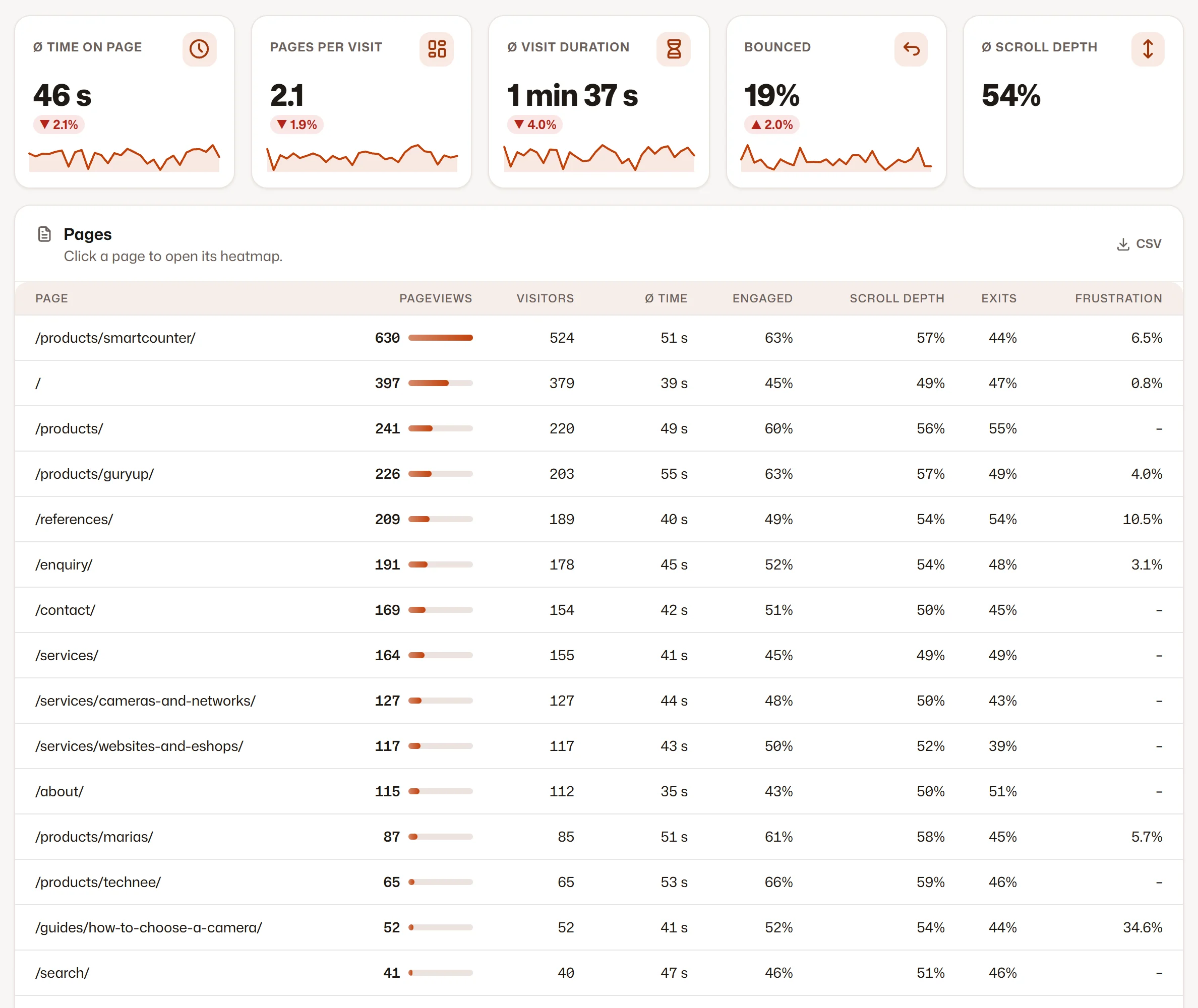
Every page with its numbers
II.

Read through and searched for

Longer texts with their length and how many views read them through, and the words people searched for on your site.

  1. 1Reading longer texts
  2. 2Site search
Read through and searched for

Screenshots of the Visitics dashboard with demo data.

In detail

How it works under the hood

Engaged, not just loaded

A pageview counts as engaged after 15 seconds of activity, or with three quarters of the page scrolled after 5 seconds. Time counts only while the tab is in front, so a page left open overnight does not inflate it.

Reading longer texts

For pages of at least 300 words Visitics compares the active time of a view with the time a quick reader needs at 400 words a minute, and checks that 75 % of the page was scrolled. You see the length in words and minutes, the views, the reads and their share.

What visitors look for

Site search is read from the address of the results page, without any setup. The searched words are counted, and the average number of words per search shows whether people type keywords or whole questions.

Where visitors arrive and leave

Entry pages show where visits start, exit pages where they end and how often. A click on a page in the table opens its heatmap.

When they come

A map of weekdays and hours shows when your visitors are on the site, in the time zone of your website — for planning posts, campaigns or support.

Everything it does

Everything in Content analytics

  • Time on page, pages per visit, visit length, bounce rate and scroll depth
  • Every page with views, visitors, time, engagement, scroll, exits and frustration
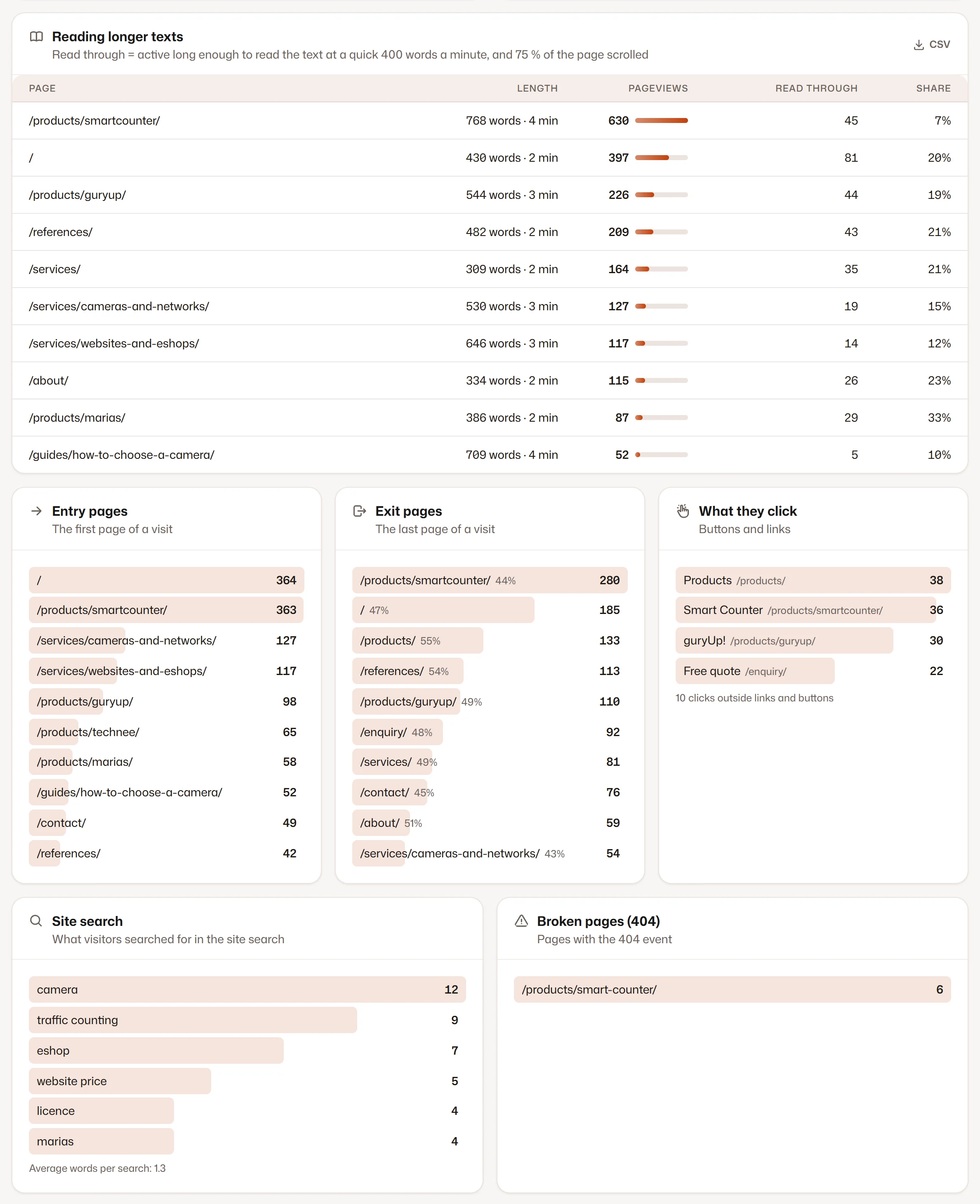
  • Reading through: pages of 300 words and more, at 400 words a minute and 75 % scrolled
  • Site search: the searched words and the average words per search
  • Entry and exit pages, with the exit rate
  • The most clicked elements and dead clicks across the site
  • Missing pages (404) with the number of views
  • Visitors by weekday and hour

Privacy

What is stored — and what is not

Stored

  • Daily summaries of pages, scroll depth and reading
  • The words of a site search, from the address of its results
  • The address of a missing page

Never stored

  • What visitors type outside your site search
  • The text a visitor copies
  • Mouse movement or recordings of visits

How Visitics measures without cookies

Plans

Content analytics in the plans

The values come straight from the price list. Every new organization tries Aura free for 14 days, without a payment card.

Content analytics in the plans
Novafree, no time limit Pulse€9 a month Aura€29 a month Luna€79 a month
Pages, entries, exits, scroll and site search Included Included Included Included
Reading through longer texts Included Included Included Included
Pages with a heatmap The home page 5 50 Unlimited
History 1 month 6 months 14 months 26 months
Start free Choose Pulse Choose Aura Choose Luna

See the pricing

Questions

Questions about Content analytics

How do you know a page was read?

A view counts as read through when the visitor was active long enough to read the text at a quick 400 words a minute and scrolled through 75 % of the page. A glance does not count; a fast reader does.

Where do the words of a page come from?

From your latest SEO audit, which counts the words of the main text without menus, headers, footers and forms. The tracking script sends nothing more; a page the audit did not crawl has no number yet.

Which site searches are measured?

A search whose words are in the address of the results — the parameter q, s, search, query, suche or hladat. WordPress, for example, uses s.

Do I need to set anything up?

No. Pages, scroll depth, entries, exits, site search and missing pages are measured by the tracking script on every page; reading starts with your first SEO audit.

Is it in the free plan?

Yes, content analytics is in every plan; the plan decides the history and how many pages show a heatmap (see the table above).

Can I see one part of the site only?

Yes. Content groups such as /blog/*/ narrow the whole section to one group, so you compare articles, products or services among themselves.

Try Content analytics on your site

One line of code and the first data within seconds. Aura free for 14 days, then Nova with no time limit — no payment card.