Skip to content
Visiticsby esentra
EN

Free in Nova and every plan

AI Observability: what your AI costs and how it runs

Your application calls OpenAI, Anthropic, Google, Mistral or your own model. Visitics shows what each call costs, how fast it is and how often it fails, by model, feature and prompt version. It keeps numbers and names only: prompts and answers are never stored.

What it is for

What it helps you with

  1. 01

    Costs you can explain

    Instead of one sum on the provider’s invoice, you see the cost by model, feature, prompt version and user, with a monthly budget and a forecast for the month.

  2. 02

    Speed and errors in one place

    The median and p95 latency, the time to the first token and the errors of each model, with every request as a waterfall of its steps.

  3. 03

    Numbers, never content

    Prompts and answers are dropped before anything is written, and no setting turns that off. Visitics holds no conversations of your users.

How it works

Real screens of the dashboard

I.

The overview of your AI

Six figures with their change against the period before, what to look at first and the cost of each day by model. Filter the whole page by environment, provider, model or feature.

  1. 1Calls, cost, tokens, latency, first token and errors
  2. 2What to look at, with the figure behind it
  3. 3The cost by model, day by day
  4. 4The month so far, its forecast and your budget
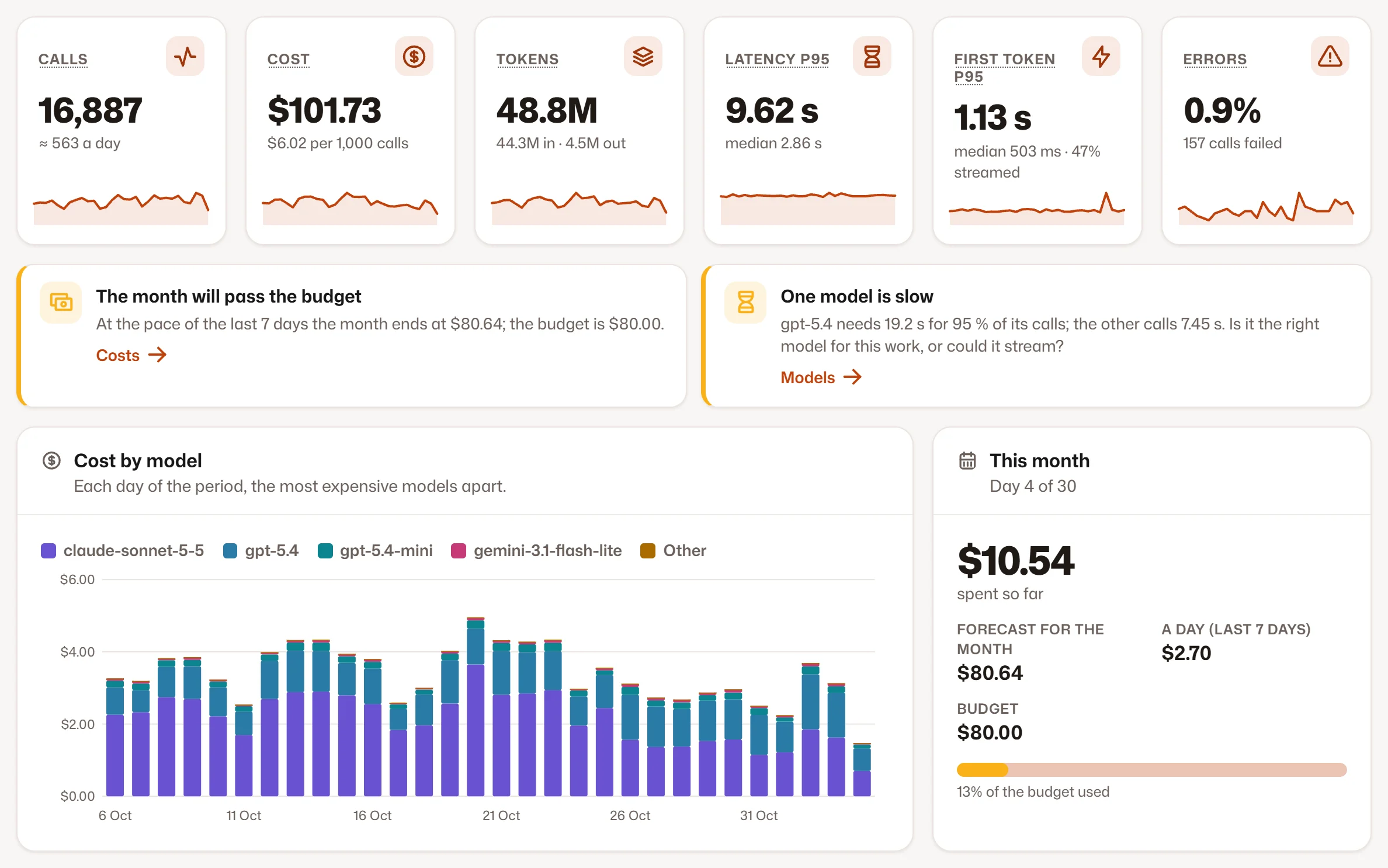
The overview of your AI
II.

One request, step by step

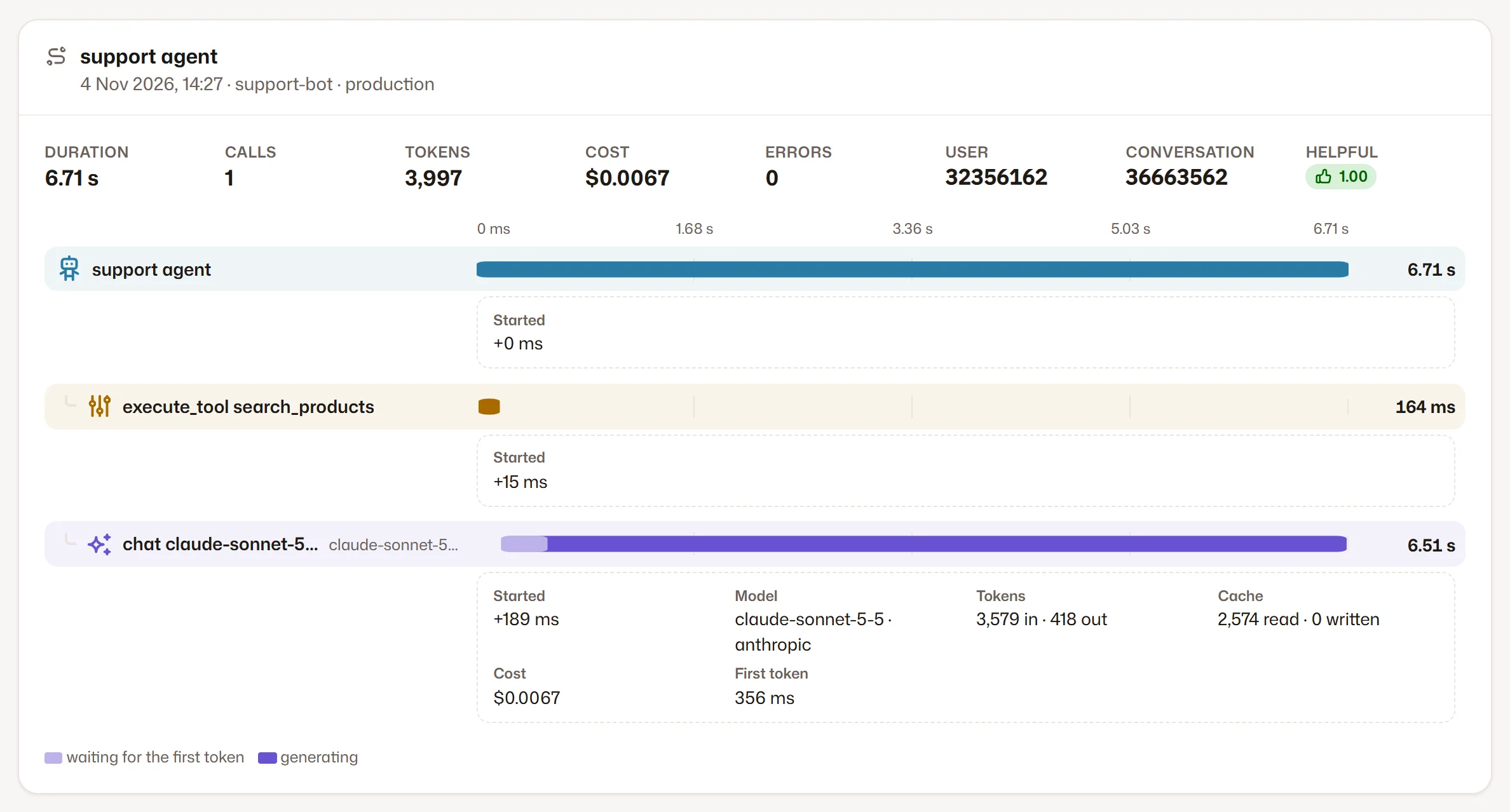
Every request of your application is a trace. Its waterfall shows the agent, the tools, the retrieval and the model calls in time, with the tokens, cost, first token and error code of each call. Prompts and answers are not there, because they were never stored.

  1. 1The totals of the trace and its rating
  2. 2The steps in time
One request, step by step
III.

Models side by side

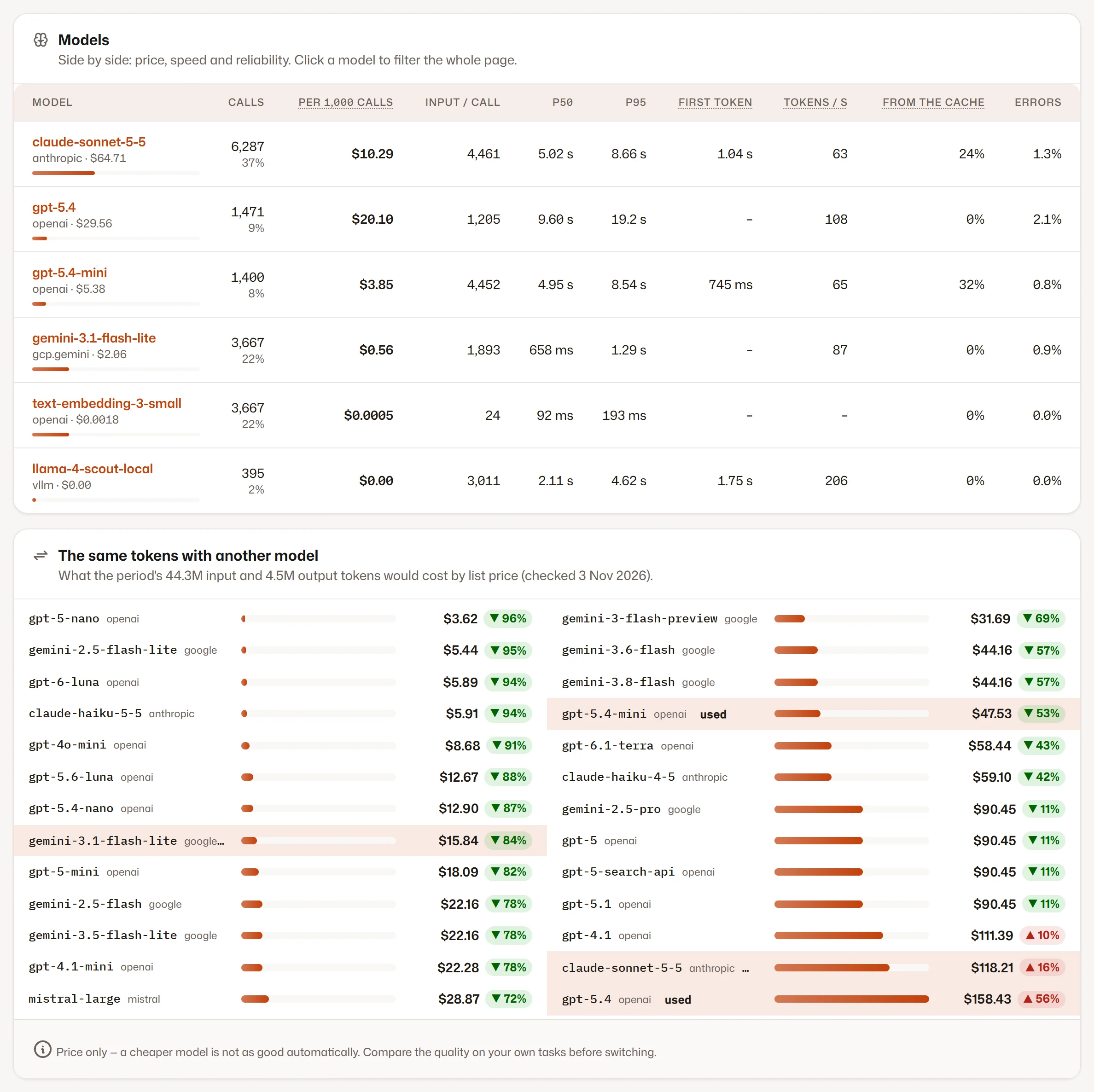
The price per 1,000 calls, p50 and p95, the first token, tokens a second, the use of the cache and the errors, all from your own traffic. Below them, what the same tokens would cost with another model from the price list.

  1. 1Your models compared
  2. 2The same tokens with another model
Models side by side
IV.

The versions of a prompt

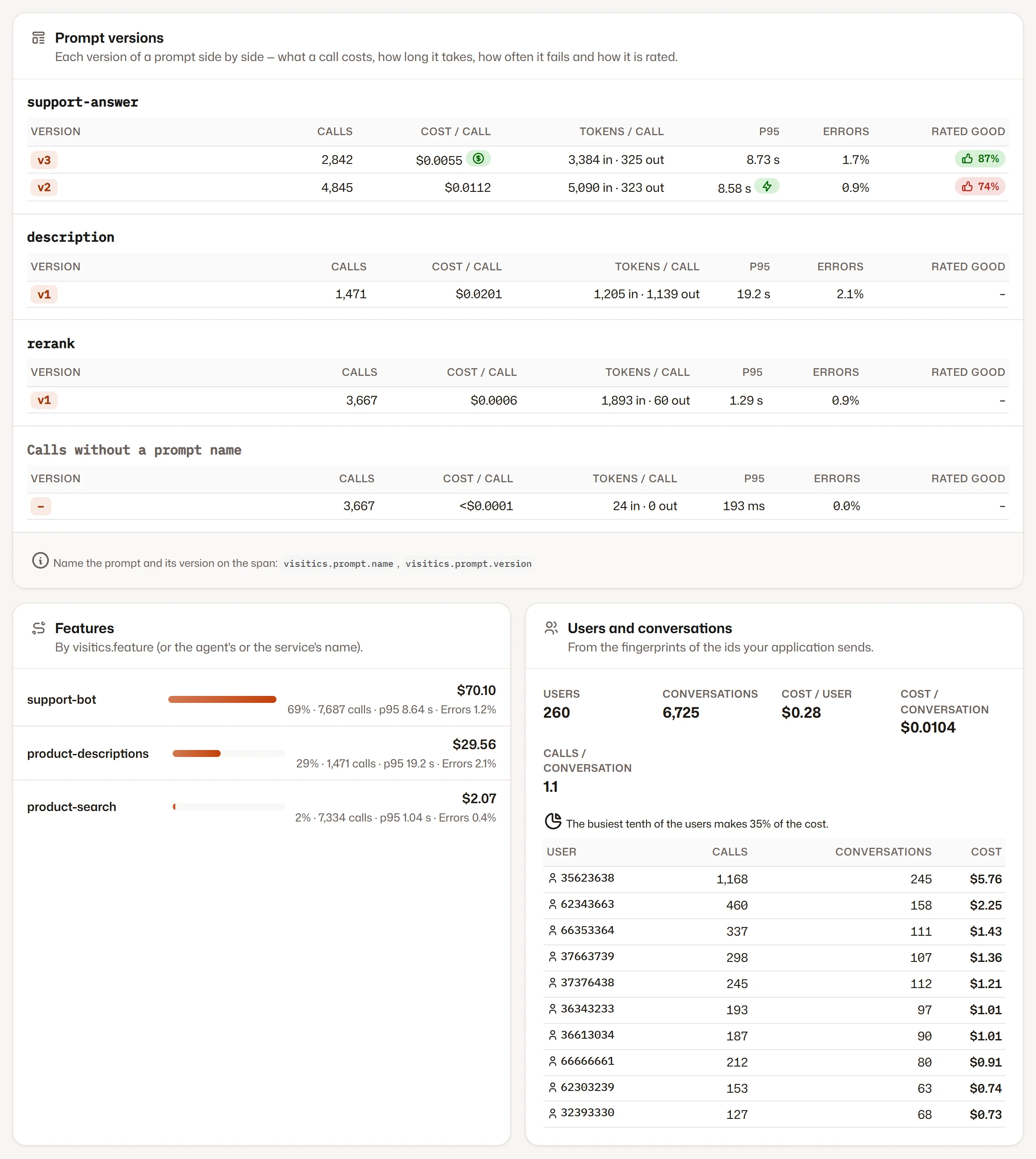
Name a prompt and its version when you call the model, and each version gets its own row: the cost of a call, its tokens, p95, the errors and how people rated the answers. Features, users and conversations are on the same tab.

  1. 1Prompt versions side by side
  2. 2The features of your application
  3. 3Users and conversations, as fingerprints
The versions of a prompt
V.

Connected in three steps

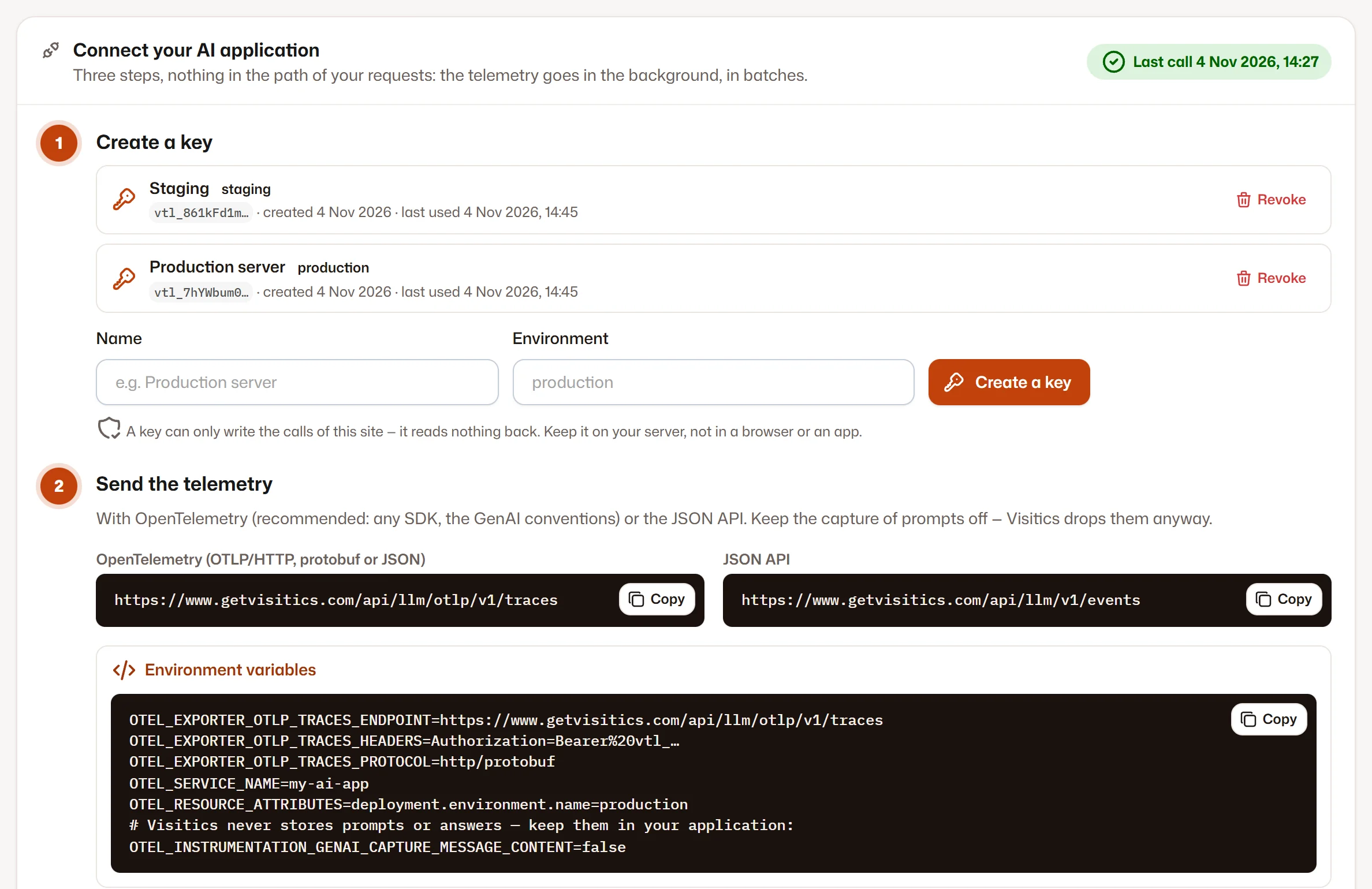
Create a write-only key, point your application at Visitics and make a few calls: they appear within seconds. Nothing stands in the path of your requests, and the setup keeps the capture of prompts off.

  1. 1Write-only keys for each environment
  2. 2The addresses for OpenTelemetry and the JSON API
  3. 3Ready code for environment variables, Python, Node.js and curl
Connected in three steps

Screenshots of the Visitics dashboard with demo data.

In detail

How it works under the hood

OpenTelemetry instead of a new SDK

Visitics takes the OpenTelemetry GenAI conventions over OTLP/HTTP, as protobuf or JSON, compressed with gzip too. An application that already has the instrumentation needs only the address and a key, and whatever else it exports, such as HTTP requests or database queries, is left out.

A JSON API for the simple cases

One POST request with up to 500 calls: the model, the tokens, the times and the names you choose. The usage objects of OpenAI, Anthropic and Gemini are read as they come, and a second endpoint takes the ratings of answers, such as a thumb up or down.

Outside the path of your requests

Visitics is no proxy and adds no wait to a call. OpenTelemetry sends in batches in the background, Visitics answers at once and writes afterwards, and a batch sent twice counts once.

Costs by kind of token

Input, cache reads, cache writes and output each have their own price. The cost comes from a dated price list of OpenAI, Anthropic, Google and Mistral, from your own prices or from your application. A model without a price shows as unknown, not as zero.

Insights backed by numbers

The overview says what to look at and gives the figure behind it: a month heading past the budget, a cost that grows with more calls or with dearer ones, more errors, a slow model, a slow first token, a prompt cache that would save money, a prompt version that costs more.

AI next to your goals

When your server sends the visitor’s IP address and browser with a call, Visitics makes the same daily fingerprint as for a visit and stores neither. You then see whether visitors who used your AI reach your goals more often than the others: a correlation, not proof. Without it, and without the tracking script, everything else works the same.

Everything it does

Everything in AI Observability

  • Calls, tokens, cost in US dollars, latency, first token and errors, with the change against the period before
  • Periods of 24 hours, 7, 30 and 90 days, filters by environment, provider, model and feature
  • Insights: rising costs, more errors, a slow model, a prompt cache that would save money, a dearer prompt version
  • Traces as a waterfall of agents, model calls, tools and retrieval, with lists of the failed, slowest and most expensive ones
  • Models compared: cost per 1,000 calls, p50, p95, first token, tokens a second, cache use and errors
  • What the same tokens would cost with another model from the price list
  • Prompt versions side by side, with the ratings of answers your application sends
  • Cost by feature, kind of token and day, per user and per conversation
  • A monthly budget with a forecast for the month and e-mails at 80 % and 100 % of it
  • Write-only keys for each environment, which you can revoke at any time

Privacy

What is stored — and what is not

Stored

  • The numbers of each call: tokens, times, cost and whether it failed
  • The names your application sends: model, feature, prompt name and version, environment
  • Fingerprints of user and conversation ids, never the ids themselves

Never stored

  • Prompts, answers, instructions, or the arguments and results of tools
  • The text of error messages: an error stays only as a short code
  • The IP address or browser of a visitor, which serve only for the daily fingerprint if you send them

How Visitics measures without cookies

Plans

AI Observability in the plans

The values come straight from the price list. Every new organization tries Aura free for 14 days, without a payment card.

AI Observability in the plans
Novafree, no time limit Pulse€9 a month Aura€29 a month Luna€79 a month
AI calls a month with details 10,000 100,000 1,000,000 5,000,000
Details of a call kept 30 days 30 days 30 days 30 days
E-mail at 80 % and 100 % of the budget Not in this plan Included Included Included
Start free Choose Pulse Choose Aura Choose Luna

See the pricing

Questions

Questions about AI Observability

Is this the same as AI & LLM analytics?

No. AI Observability, also known as LLM observability, measures the AI your own application calls: what it costs, how fast it is and how often it fails. AI & LLM analytics measures something else: the visits that assistants such as ChatGPT send to your website and the AI crawlers that read it.

Does Visitics keep my prompts and answers?

No. Prompts, answers, instructions and the data of tools are dropped while a request is being read, the JSON API has no field for them, and the setup tells your SDK not to send them at all. No plan or setting changes that.

Does Visitics sit between my application and the model?

No, it is not a proxy. Your application calls the model as before and reports its telemetry separately, in batches in the background. When Visitics cannot be reached, your calls go on as usual; only their telemetry may be missing.

Which models and SDKs work?

Any model your application reports. Visitics reads the OpenTelemetry GenAI conventions, so instrumentations such as OpenLLMetry and the Vercel AI SDK can send to it directly, and the setup has ready code for environment variables, Python, Node.js and the JSON API. The price list covers OpenAI, Anthropic, Google and Mistral; give any other model, such as one on your own server, your own price.

How exact are the costs?

They are an estimate from the tokens of each kind and the providers’ list prices. Each price has its date, so a later change does not rewrite past days. For a negotiated price, set your own or have your application send the cost with the call. The provider’s invoice stays the final word.

What happens when I reach the limit of my plan?

Nothing stops. Calls over the limit are still summed, so costs, tokens and counts stay complete; only their details, such as the waterfall, are not kept for the rest of the month.

How long is the data kept?

The details of each call stay for 30 days. The daily summaries follow the history of your plan, and the page shows up to the last 90 days of them. All of it stays in the EU, and it goes when you delete the site.

Try AI Observability on your site

A key and a few lines of setup, and the first calls appear within seconds. Aura free for 14 days, then Nova with no time limit — no payment card.